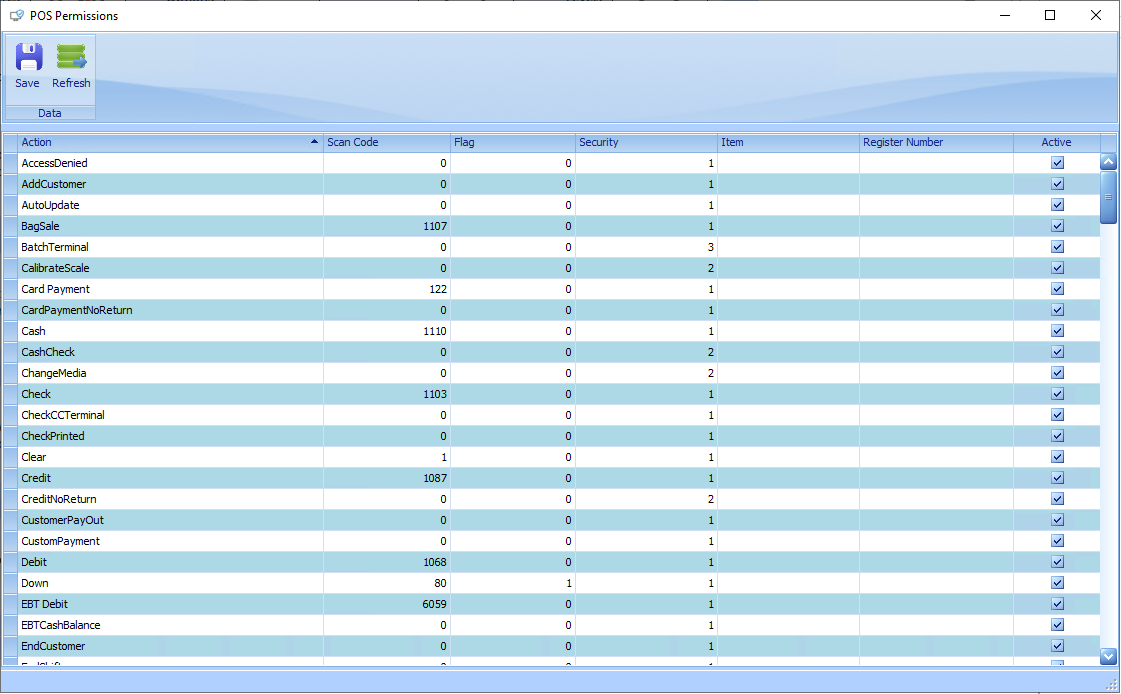
POS Permissions allows the configuration of the three POS Security Levels in StoreLIVE: Cashier, Service Desk, and Manager. These Security Levels control access to a wide range of POS functions, including returns, receipt reprints, the Manager Menu, SubMenus, among others. Each user is assigned a Security Level based on the access they should have. Each Security Level has a default set of permissions, but those permissions can be customized to meet operational requirements or preferences, either globally or for individual registers. This allows the same function to require different Security Levels on different registers, providing flexibility to meet operational and security requirements. To change the Security Level required for a function, enter the number corresponding to the desired Security Level in the Security column (1 = Cashier, 2 = Service Desk, 3 = Manager).
The Scan Code and Flag fields allow keyboard shortcut keys to be assigned to StoreLIVE functions at the POS. The QuickKey action uses the Scan Code, Flag, and Item fields together to assign shortcut keys to specific items, allowing those items to be accessed quickly from a keyboard. Contact Good’s Technology Services if you are interested in setting up keyboard shortcuts.