
Percentage-off discounts can be applied to the entire transaction, or at an interval in the transaction in which the discount will apply to all items currently on the transaction, but not to items added after the discount is applied.
To apply a transaction discount, press the Subtotal button and then press the “Discount Coupon” button. Choose the “Store Coupon % Off” button, and enter the percent off amount when prompted. The system will add a “Sub-Total Discount” line to the transaction reflecting the amount of the discount.
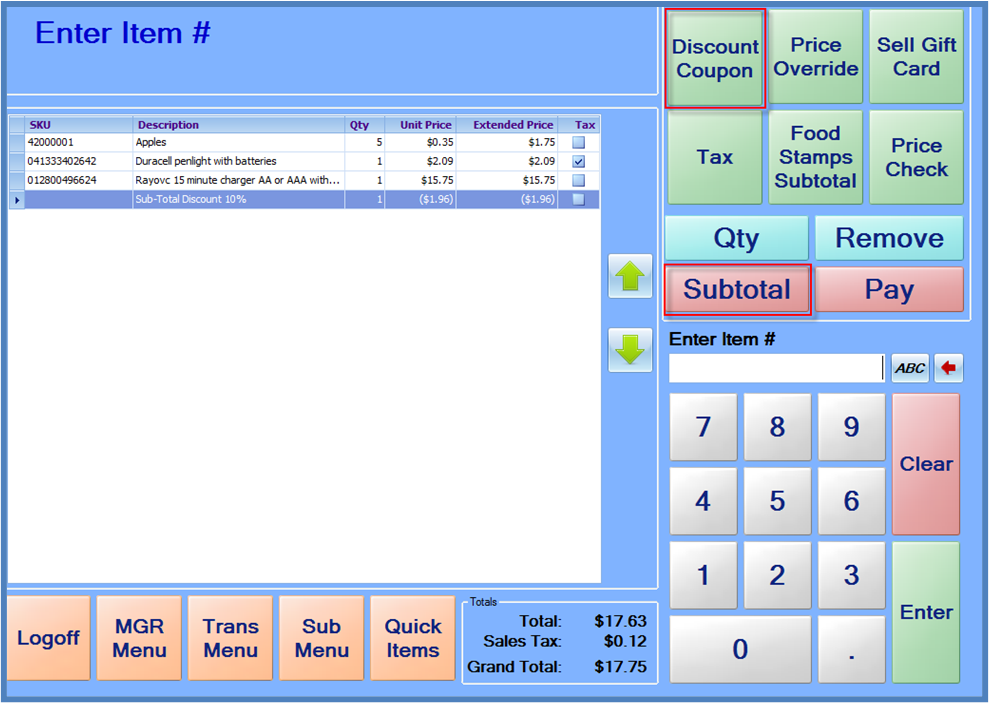
Note on Item and Transaction discounts: The system will not “double discount” items using the “Store Coupon” options. For example, if a store coupon is applied to 1 item on the sale, and a transaction discount is applied to the entire sale, the transaction discount will not include the item that received the store coupon. However, items that have manufacturer coupons applied to them will be included in transaction discounts.